DRKDS Studio

The complete visual customization toolkit for Odoo 19 Community Edition. No Enterprise license required.

Odoo 19 Community 35+ Features Zero External Dependencies Production Ready v1.0.0
35+
Studio Features
19
Panel Tabs
0
External Libraries
<1s
Load Time
Overview

Everything Odoo Enterprise Studio Offers โ€” Free

DRKDS Studio brings Enterprise-grade customization to Odoo 19 Community. Add fields, build views, create automations, design reports, manage access rights, and much more โ€” all from an elegant floating panel.

Fields Add Field Properties Automation Menu Editor Report Builder Access Rights Record Rules Scheduled Actions Server Actions Email Templates Webhooks Sequences Activity Types Default Values Saved Filters Relation Browser Export Templates Selection Editor
๐Ÿ—

Field Manager

Add, edit, and manage custom fields on any model. Supports all Odoo field types: Char, Text, Integer, Float, Boolean, Date, DateTime, Selection, Many2one, Monetary, Binary.

๐Ÿ–ผ

View Builder

Visually build and modify Form, List, Kanban, Pivot, Graph, Search, and Calendar views. Drag fields into position, set conditional attributes, manage columns.

โšก

Automation Builder

Create and manage automation rules inline. Full support for all 7 action types: code execution, field write, email, followers, activities, SMS, record creation.

๐Ÿ“„

QWeb Report Designer

Design and generate PDF/HTML reports with a click. Choose fields, pick a template style, and print directly from any model's form or list view.

๐Ÿ”

Security Manager

Manage access rights and record rules visually. Toggle RWCD permissions per group with clickable badges. Create domain-based row-level security rules.

๐Ÿ—‚

Custom Model Creator

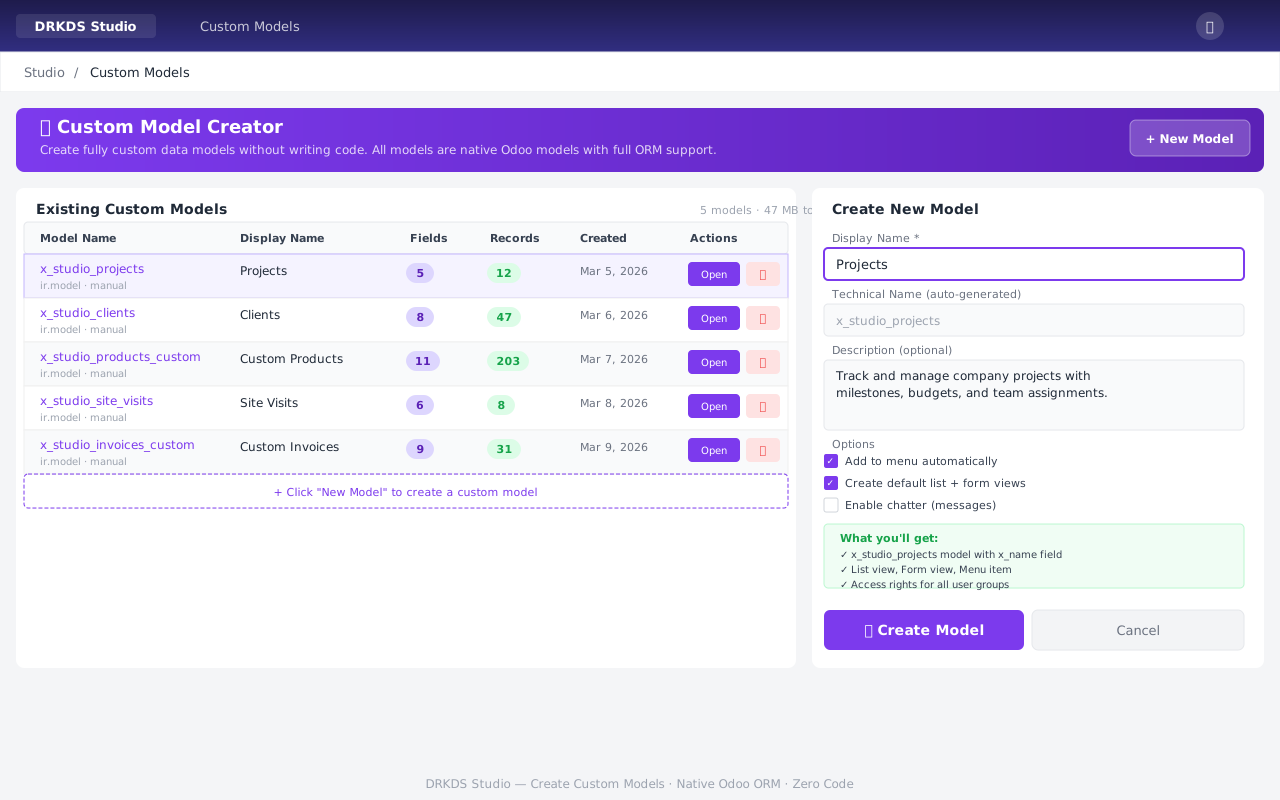
Create fully custom Odoo models without writing code. Automatically generates views, menus, and access rights. Native ORM support from day one.

Screenshots

See It In Action

Professional-grade UI designed to feel native in Odoo 19. The floating panel stays out of your way until you need it.
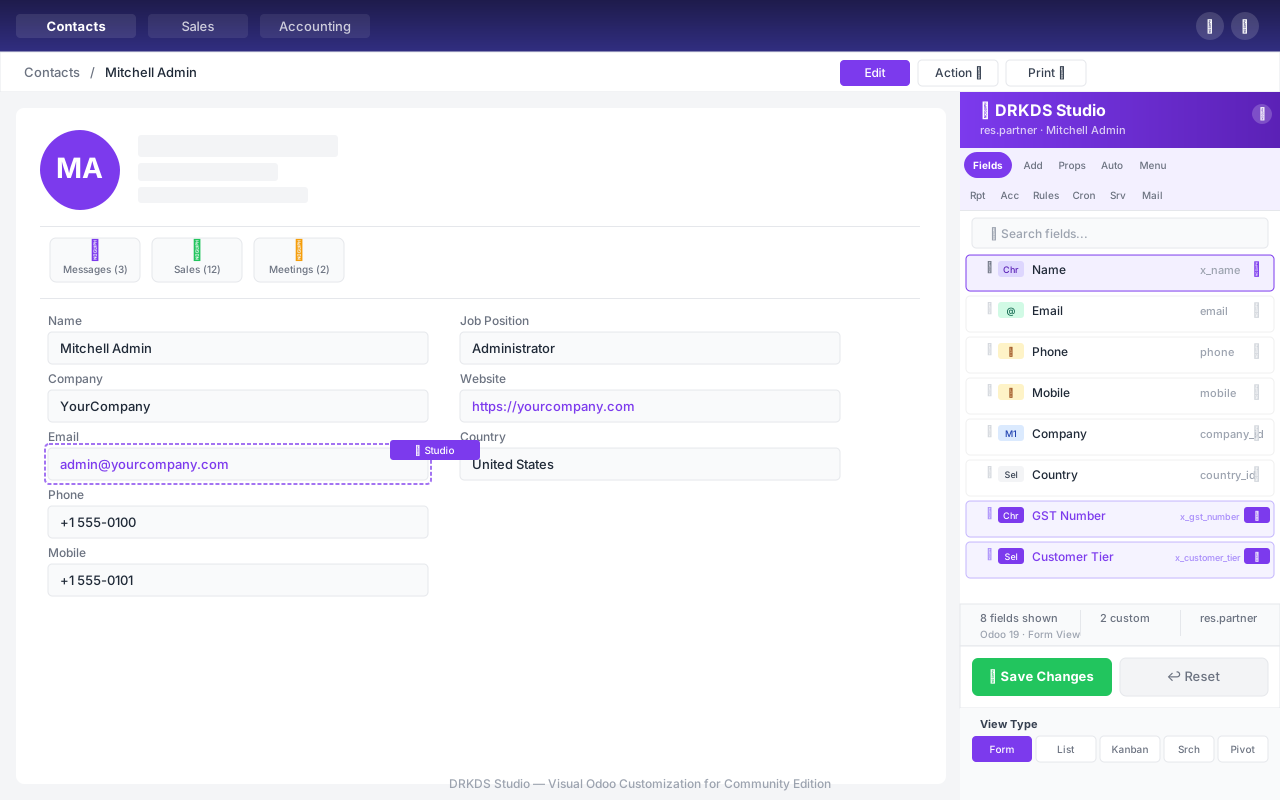
Studio Overview โ€” Fields tab showing draggable field list
Studio Overview Fields tab with drag handles, type badges, custom field indicators, and view type switcher
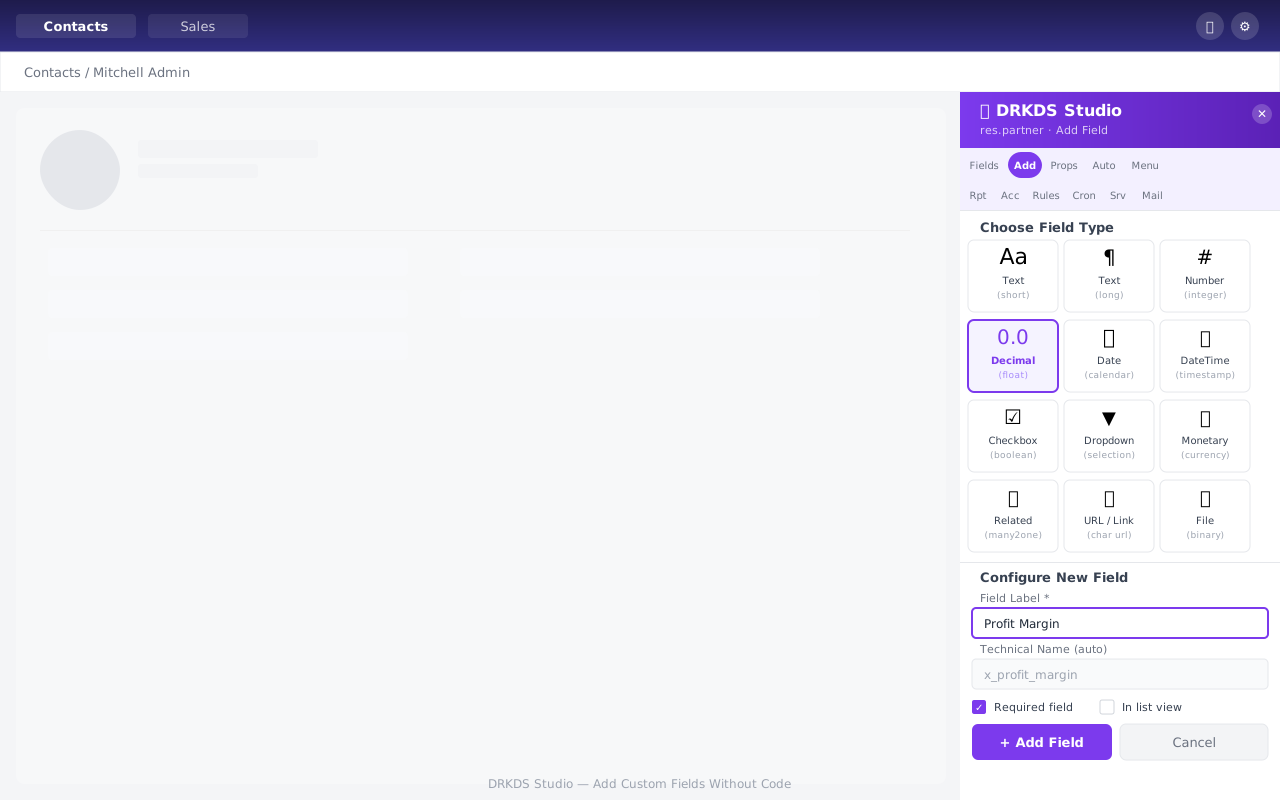
Add Custom Field โ€” Type picker grid with field configuration form
Add Custom Field 11-type picker grid with automatic technical name generation and validation options
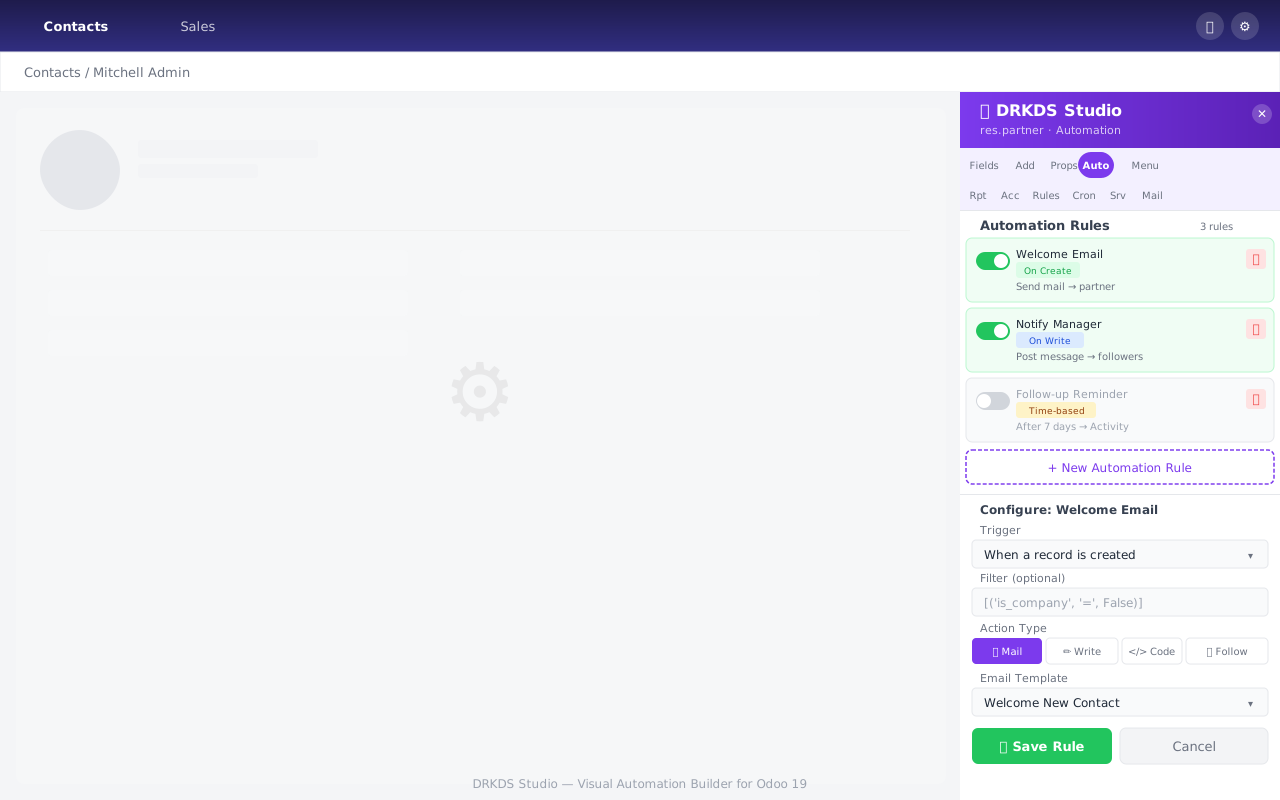
Automation Builder โ€” Rules list with inline configuration panel
Automation Builder Manage automation rules with toggles, trigger type badges, and inline action configuration
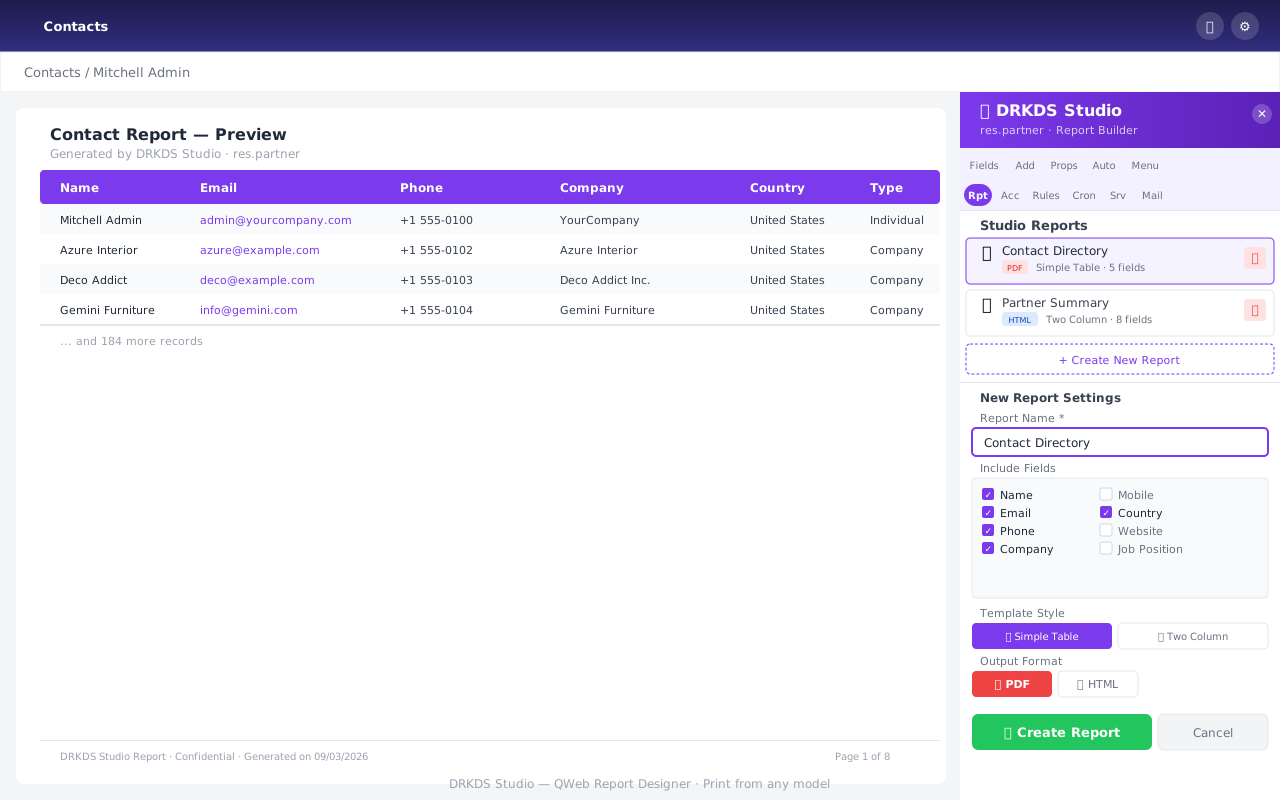
QWeb Report Designer โ€” Field picker and template selector with live preview
QWeb Report Designer Build PDF/HTML reports by picking fields and choosing a template style โ€” no XML required
Custom Model Creator โ€” Model manager table with creation form
Custom Model Creator Create and manage custom Odoo models with automatic view, menu, and access right generation
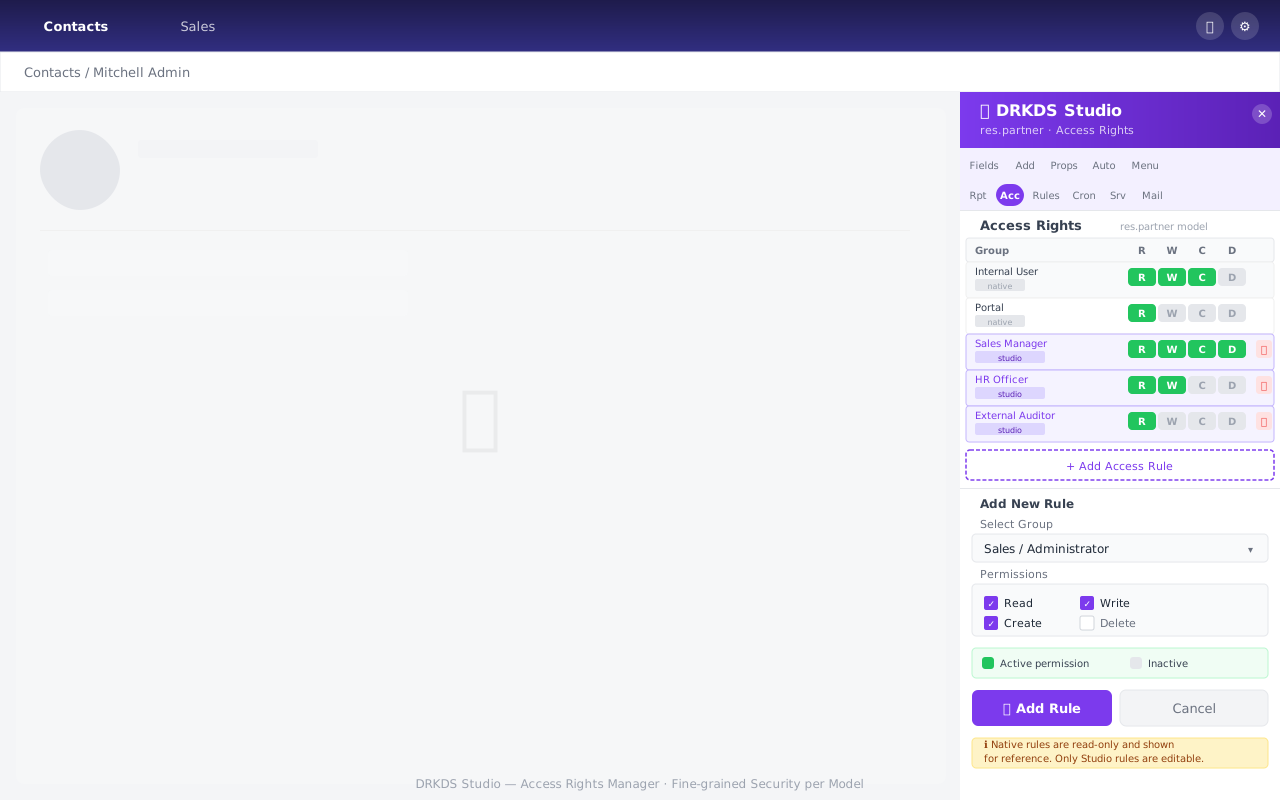
Access Rights Manager โ€” Permission badges table with group picker
Access Rights Manager Clickable R/W/C/D permission badges per group. Studio rules are editable; native rules shown read-only
All Features

35+ Capabilities, Organized by Category

Every feature works independently. Use what you need, ignore the rest.

Field & View Management

  • โœ“ Add custom fields (11 types) with auto-naming
  • โœ“ Drag-and-drop field reordering on forms
  • โœ“ Field conditional attributes (required/readonly/invisible)
  • โœ“ Widget selector per field type
  • โœ“ Form view builder with group/field management
  • โœ“ List view column add/remove/reorder
  • โœ“ Kanban view builder with card layout
  • โœ“ Pivot view with row/column/measure roles
  • โœ“ Graph view with chart type selector
  • โœ“ Search view field/filter/group builder
  • โœ“ Calendar view configuration panel
  • โœ“ Gantt view (Frappe Gantt, bundled)
  • โœ“ Create / manage multiple views per model
  • โœ“ Selection field values editor

Automation & Logic

  • โœ“ Full inline Automation Builder (all 7 action types)
  • โœ“ Server Actions Builder with binding
  • โœ“ Scheduled Actions (Cron) Manager
  • โœ“ Outgoing Webhook Builder (POST on triggers)
  • โœ“ Email Template Builder
  • โœ“ Activity Type Manager
  • โœ“ Field Default Values Manager
  • โœ“ Saved Filters Manager
  • โœ“ Sequence Builder with preview

Security & Access

  • โœ“ Access Rights Manager (RWCD per group)
  • โœ“ Record Rules Manager (domain-based)
  • โœ“ Toggle permissions via clickable badges
  • โœ“ Group picker with full group hierarchy
  • โœ“ Studio rules vs native rules distinction

Reports & Data

  • โœ“ QWeb Report Designer (PDF + HTML)
  • โœ“ Multiple template styles (Table, Two-column, etc.)
  • โœ“ Report bound to model's Print menu
  • โœ“ Data Export Templates Manager
  • โœ“ CSV/XLS Import Wizard (3-step, auto-map)
  • โœ“ Batch Actions Builder
  • โœ“ API Info Panel with code snippets

Model & Menu

  • โœ“ Custom Model Creator (native ORM)
  • โœ“ Custom Menu & Action Builder
  • โœ“ Menu drag-and-drop reorder
  • โœ“ Global Menu Editor overlay
  • โœ“ Model Relation Browser (M2O/O2M/M2M)
  • โœ“ Studio Module Export (ZIP + manifest)
  • โœ“ Email Gateway / Alias Manager

Developer Tools

  • โœ“ Studio Stats Dashboard
  • โœ“ Model Access Rights viewer
  • โœ“ JSON-RPC API endpoints for all features
  • โœ“ OWL 3 components (Odoo 19 native)
  • โœ“ No monkey-patching of core modules
  • โœ“ Full uninstall support (clean removal)
Why Choose DRKDS Studio

Built for Community, Not Enterprise

Odoo Community is powerful but lacks the visual customization tools that come with Enterprise. DRKDS Studio closes that gap.

๐Ÿ’ฐ

Zero Enterprise Cost

Get Enterprise Studio capabilities without paying per-user Enterprise licensing fees. DRKDS Studio is a one-time community module.

๐Ÿ”’

No Data Leaves Your Server

Everything runs on your own Odoo instance. No external APIs, no SaaS subscriptions, no data sharing. Complete data sovereignty.

โšก

Instant Productivity

A non-technical user can add a custom field, create an automation rule, and design a report in under 5 minutes โ€” no development cycle needed.

๐Ÿงฉ

Truly Native

Uses only Odoo's own ORM, OWL framework, and QWeb engine. No external JS libraries. No shadow DOM hacks. Feels like a built-in feature.

๐Ÿ”ง

Developer-Friendly

All customizations produce clean Odoo-standard XML and Python. Export your studio changes as a proper Odoo module for version control.

๐Ÿ“ˆ

Actively Maintained

35+ features across 35 development phases. Built for Odoo 19 Community from the ground up. Regular updates and issue fixes.

Technical Requirements

Compatibility & Dependencies

Minimal dependencies. Maximum compatibility.

System Requirements

Odoo Version19.0 (Community)
Python3.11+
PostgreSQL14+
BrowserChrome 100+, Firefox 100+, Edge 100+
Disk Space~2 MB installed

Odoo Dependencies

baseRequired
webRequired
base_automationRequired
mailRequired
base_importRequired (CSV/XLS import)
Enterprise modulesNone required

What It Installs

Database tables0 custom tables
Odoo records created~30 (views, menus, actions)
Python models14 AbstractModel classes
JS/CSS assets~60 KB minified
Fully removableYes โ€” clean uninstall

Performance

Module load time< 1 second
Install queries~300 queries
Runtime overheadMinimal โ€” lazy-loaded OWL
Panel activationInstant โ€” client-side
Concurrent usersNo limit (stateless)

Start Customizing Odoo Today

Install DRKDS Studio on your Odoo 19 Community server and unlock Enterprise-level customization in minutes.

Get on Odoo App Store View on GitHub