1 / 12
Speaker Notes
← → Navigate  |  Space Advance  |  N Notes  |  F Fullscreen
Introducing
DRKDS Studio
Visual Customisation for Odoo 19 Community Edition
35+ Features Zero Code 100% Open Source
— 10-Minute Demo —

02The Challenge

Odoo Community
Lacks a Studio

Add a field? Hire a developer.
Edit a view? Write XML.
Automate a workflow? Write Python.
Create a report? Know QWeb.
😤
Developer Day Rate
₹8,000–20,000
per feature request
⏳  2–5 days wait time
Enterprise Studio
Locked behind
Enterprise licence

03The Solution

🎨 DRKDS Studio
One module. Every customisation tool.
Zero Enterprise required.
✎️
Build Views
Forms, Lists, Kanban, Pivot, Graph, Calendar, Gantt, Search — all from a visual panel
⚙️
Automate
Automation rules, Webhooks, Cron jobs, Server Actions — no Python knowledge needed
📦
Export
Package everything as a deployable, version-controlled Odoo module ZIP

04The Studio Panel

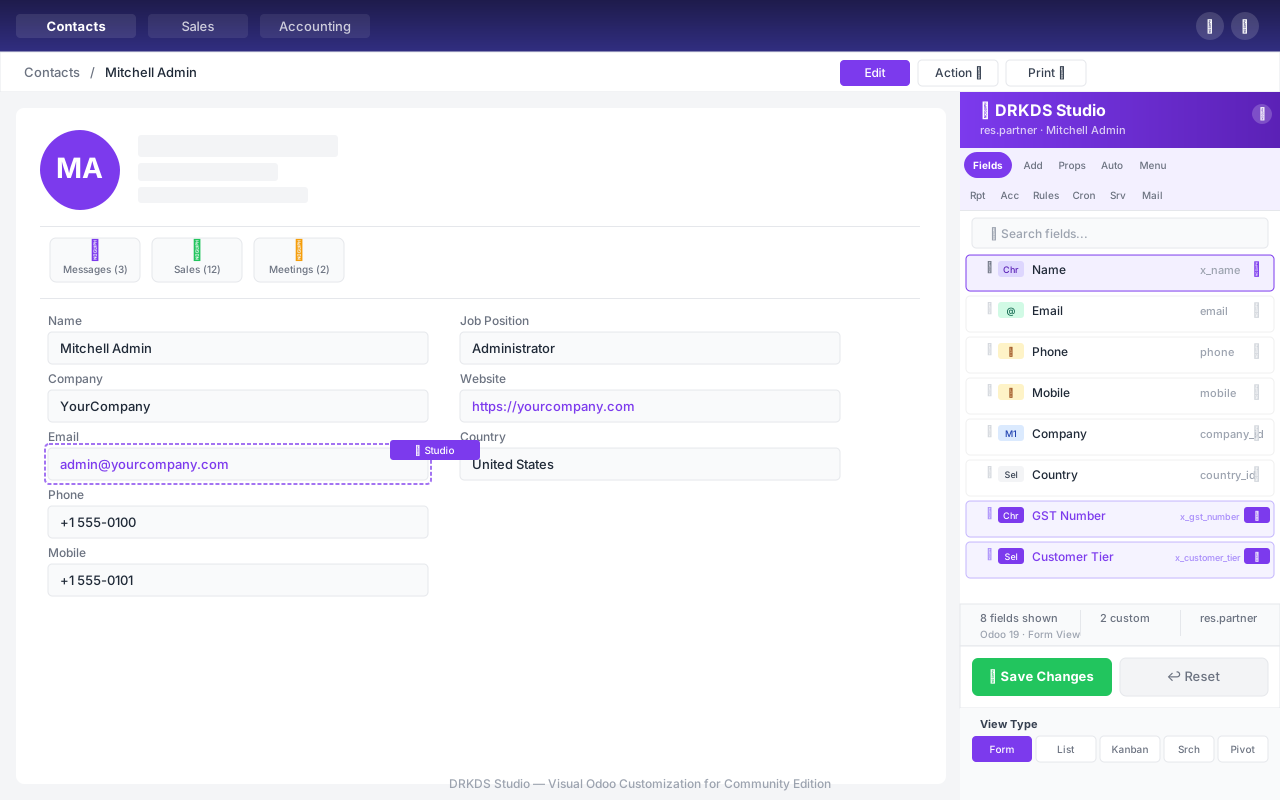
Studio Panel Overview
A floating panel opens on any screen. Choose your model, pick your tab, start customising.
Key Features
📋 19 tabs — one for every tool
🎯 Works on any Odoo model
⚡ Instant save — no restart
⚒️ Drag handles for positioning
🔐 Role-based access control
PANEL MODES
Fields / Add / Props
Auto / Menu / Report
Access / Rules / Cron / ...
05Add a Custom Field — 3 Clicks

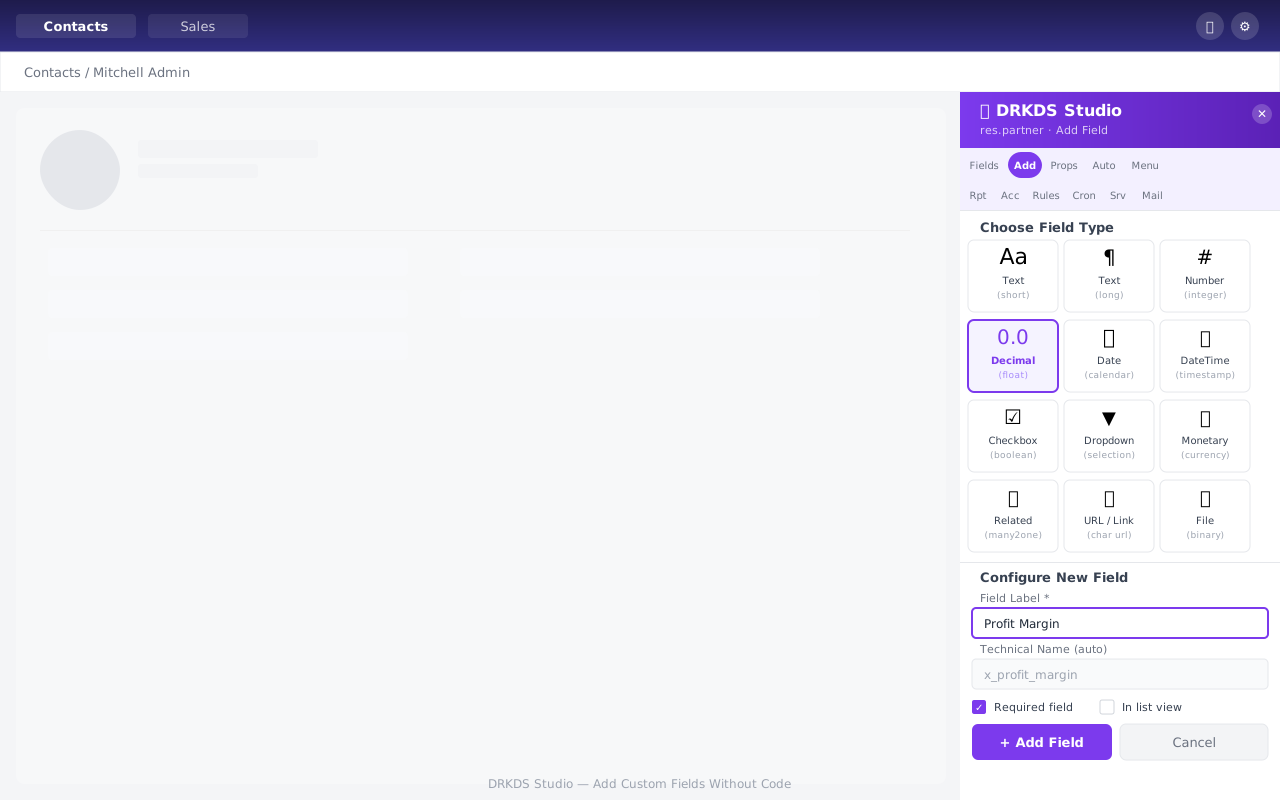
Add Field Screenshot
11 field types supported. Label auto-generates the technical name. Done in seconds.
How it works
1
Click the 'Add' tab in the panel
2
Choose field type from the visual grid
3
Enter a label → hit Save
Field Types
Char Text Integer Float Boolean Date Datetime Selection Many2one Binary HTML
06Automation Builder — No Python Required

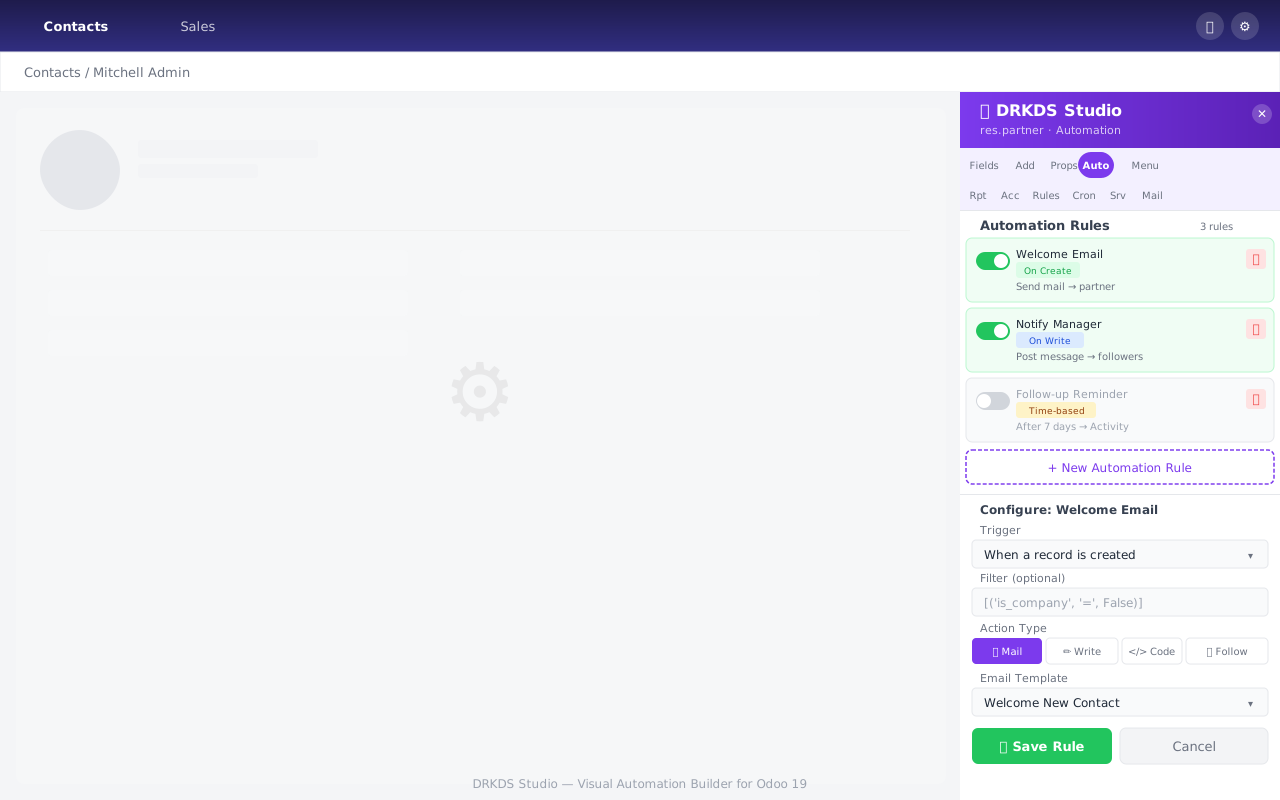
Automation Builder Screenshot
7 action types: Code, Write Field, Send Email, Follower, Activity, SMS, Create Record.
Highlight Points
💠 Trigger selector — on create, write, unlink, cron
🌭 Domain filter — visual condition builder
⌨️ Action builder — 7 types, fully inline
🔴🟢 Toggle on/off — no deletion needed
✓ Before DRKDS Studio:
Write Python + restart service
✓ After DRKDS Studio:
Click. Configure. Save. Done.
07QWeb Reports — Point & Click

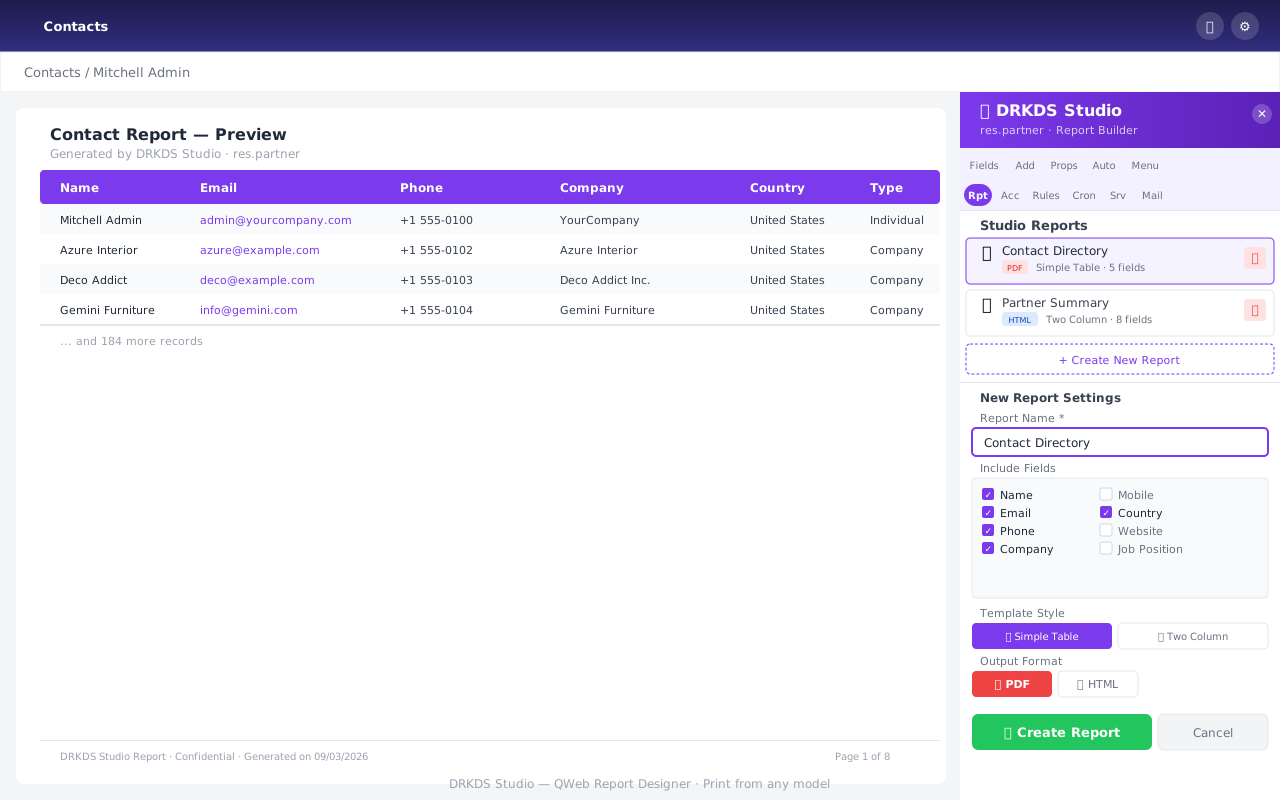
Report Builder Screenshot
Pick fields, choose a template, set PDF or HTML — report appears in the model's Print menu instantly.
Templates
Simple Table Invoice Style Two Column Delivery Slip
Output Options
📄
PDF
🌐
HTML
📈 Field picker with checkbox list
📋 Auto t-field generation
🔗 Bound to model's Print menu
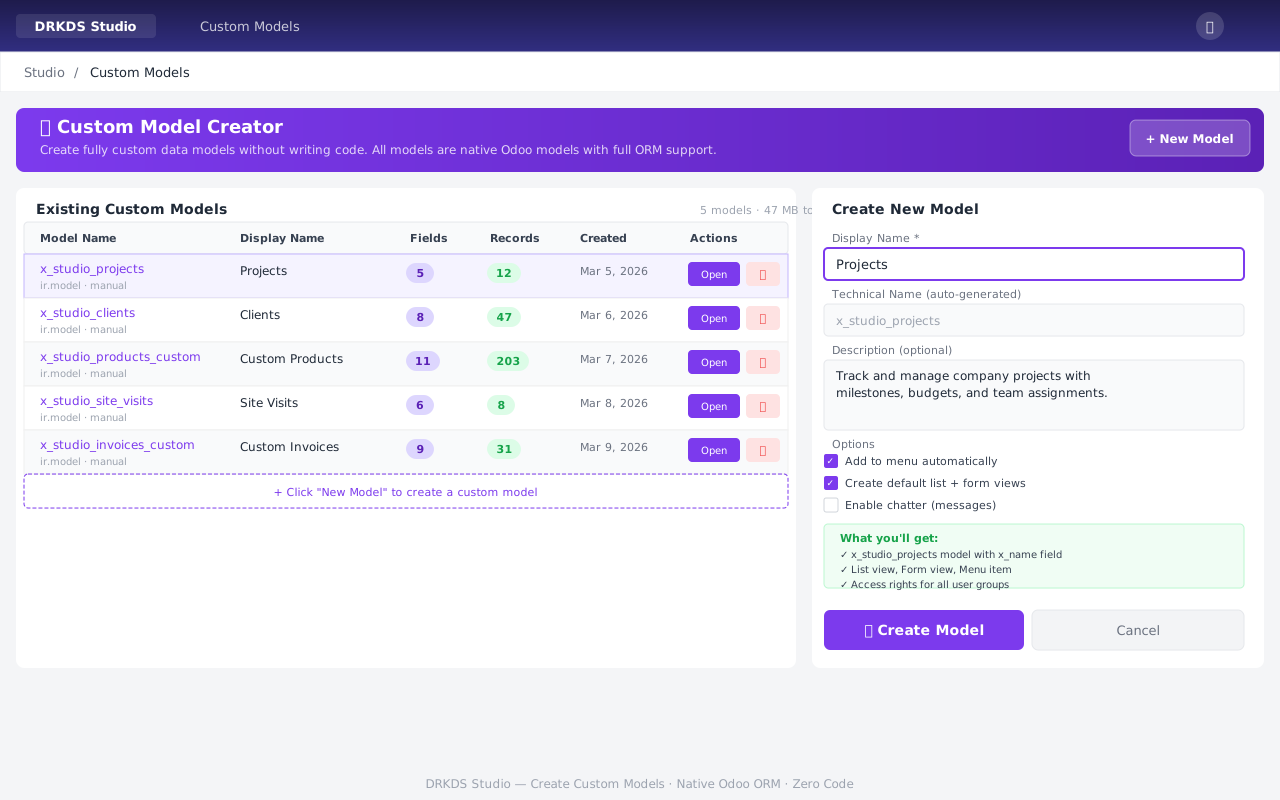
08Create Entire New Models

Custom Models Screenshot
Name it, describe it, click Create. DRKDS Studio scaffolds the entire model in one step.
Auto-generated for you
✓ Form + List + Search views
✓ Menu item created automatically
✓ Access rights configured
✓ Name field (x_name) built-in
Example models to create
‣ Customer Complaints
‣ Site Inspections
‣ Asset Register
‣ Training Tracker

09Export Everything as a Module

Your customisations become a proper Odoo module.
Version-controlled, portable, redeployable.
📦 my_customisations.zip
├─__manifest__.py
├─models/
│  └─custom_models.py
├─security/
│  └─ir.model.access.csv
└─views/
   ├─custom_model_views.xml
   └─view_customizations.xml
🚀 Deploy to any Odoo 19 instance
Why This Matters
📋
Version Control Ready
Commit the module to git. Track changes over time. Roll back if needed.
▶️
One-Click Deploy
Install on staging, then production. No manual XML copying.
👥
Client Handoff
Deliver a proper module ZIP to clients. Professional and portable.
🔄
Multi-Instance
Build once in Studio, deploy to dozens of instances.

10By The Numbers

35+
Builder Modules
172
API Endpoints
98/98
Tests Passing
0
External Dependencies
8
View Types Supported
7.7k
Lines of Code
Production-grade engineering. Zero external packages. Ready to deploy today.

11Community Gets Enterprise Power

Everything that used to require Odoo Enterprise — now in Community
Feature Plain Community DRKDS Studio
Visual field builder
View builder (8 types)
Automation UI
Report designer
Module export
vs Odoo Enterprise Studio — same capabilities, no annual licence fee.
Ready to Try It?
One module. Every customisation tool. Forever free and open source.
Odoo 19 Community · Zero Dependencies · 98/98 Tests · 35+ Features · Production Ready