The Complete Visual
Customisation Suite
for Odoo 19 Community Edition
What We'll Cover Today
The Reality of Odoo Community Today
🚧 Every Change Needs a Developer
💰 Average Cost Per Change
For a 10-person team making 2 changes/month: ₹3.8L/year
DRKDS Studio
One module. Every customisation tool. No code. No Enterprise.
The Studio Panel — First Look
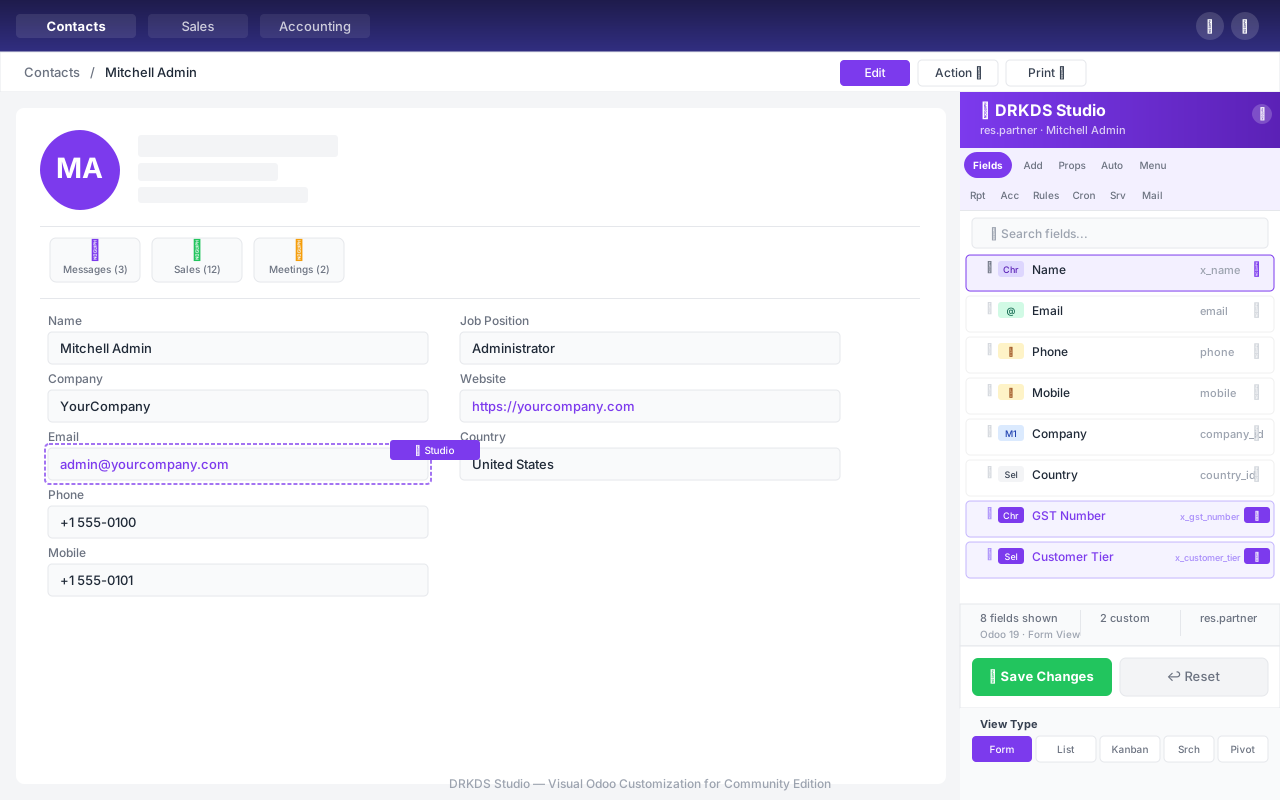
Opens from any screen. Attach to any model. Changes are instant.
19 Specialised Tools in One Panel
Works with ANY Odoo Model
Search by name or technical name. Studio works on all standard and custom models.
Form View Builder
11 Field Types — 3 Clicks to Add
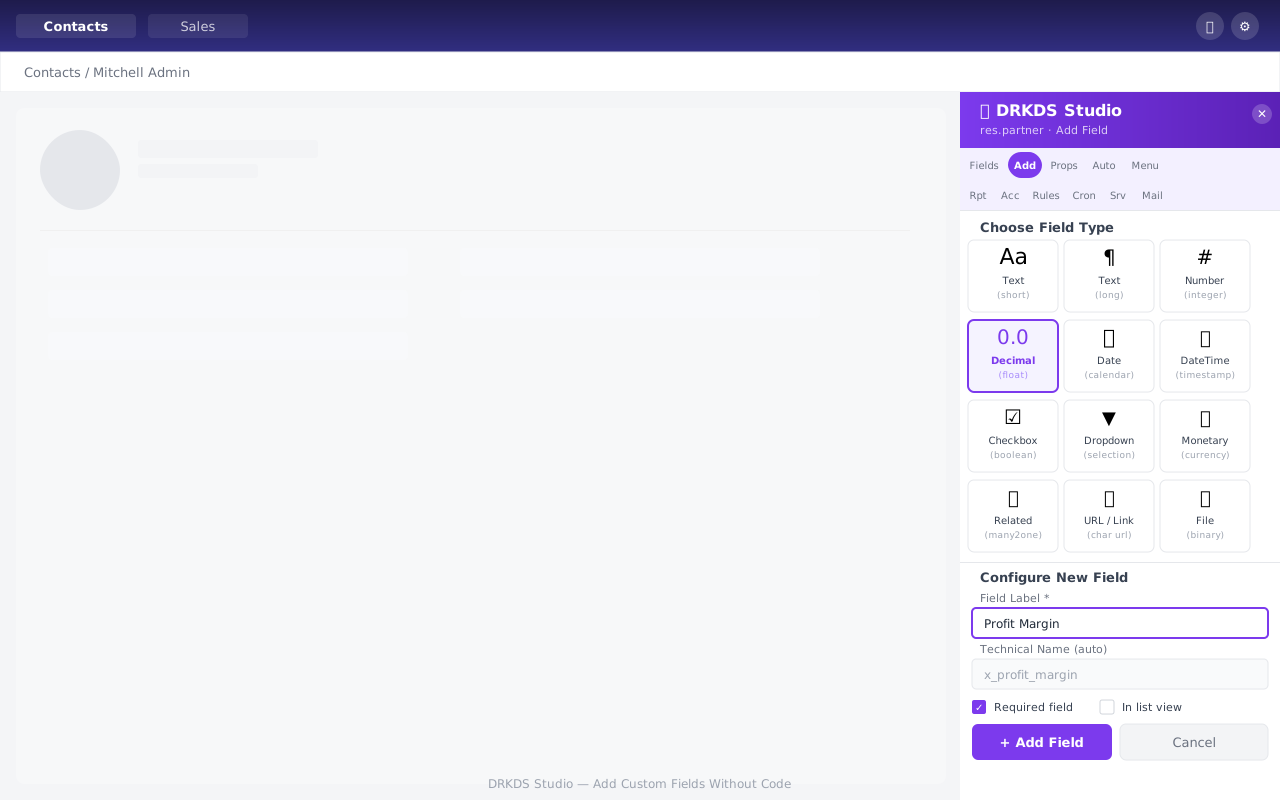
Technical name auto-generated from label. Appears on form immediately.
List View Builder
📋 Column Management
🎨 Row Decoration Rules
Color-code rows based on field values
Switch to List mode in the panel. Manage exactly which columns appear and in what order.
Kanban View Builder
🎨 Card Fields
Settings
Quick create: ON
Default group: stage_id
Card tab shows which fields appear on each Kanban card. Toggle and drag to customise.
Search View Builder
What you configure
- Search fields (char, date, M2O...)
- Filter presets with domains
- Group-by field options
Supported field types
- Text, Integer, Float, Boolean
- Date, DateTime, Selection
- Many2one, Monetary
Define what users can search, filter, and group by — without touching XML.
Pivot View Builder
| Category | Jan 2026 | Feb 2026 | Mar 2026 | Total |
|---|---|---|---|---|
| Electronics | ₹2.4L | ₹2.8L | ₹3.1L | ₹8.3L |
| Furniture | ₹1.2L | ₹0.9L | ₹1.4L | ₹3.5L |
Row Fields
product_category
Column Fields
date_order (month)
Measure Fields
amount_total (sum)
Build pivot tables for any model. Perfect for management dashboards.
Graph View Builder
Chart Type
Field Roles
Choose chart type, set X-axis grouping and Y-axis measures. Stacked or unstacked.
Calendar View Builder
Start Date
date_order (auto-detected)
End Date
commitment_date (optional)
Event Label
name / display_name
Color By
user_id (many2one)
Quick Create
Enabled
Auto-detects best date field. Day/Week/Month/Year modes configurable.
Gantt View Builder
Powered by
Frappe Gantt v0.6.1
Bundled locally
View type
9th view type
Unique to Studio
CDN required?
No ✓
Works offline
Zoom levels
Day/Week/Month
Automation Builder — Full Inline
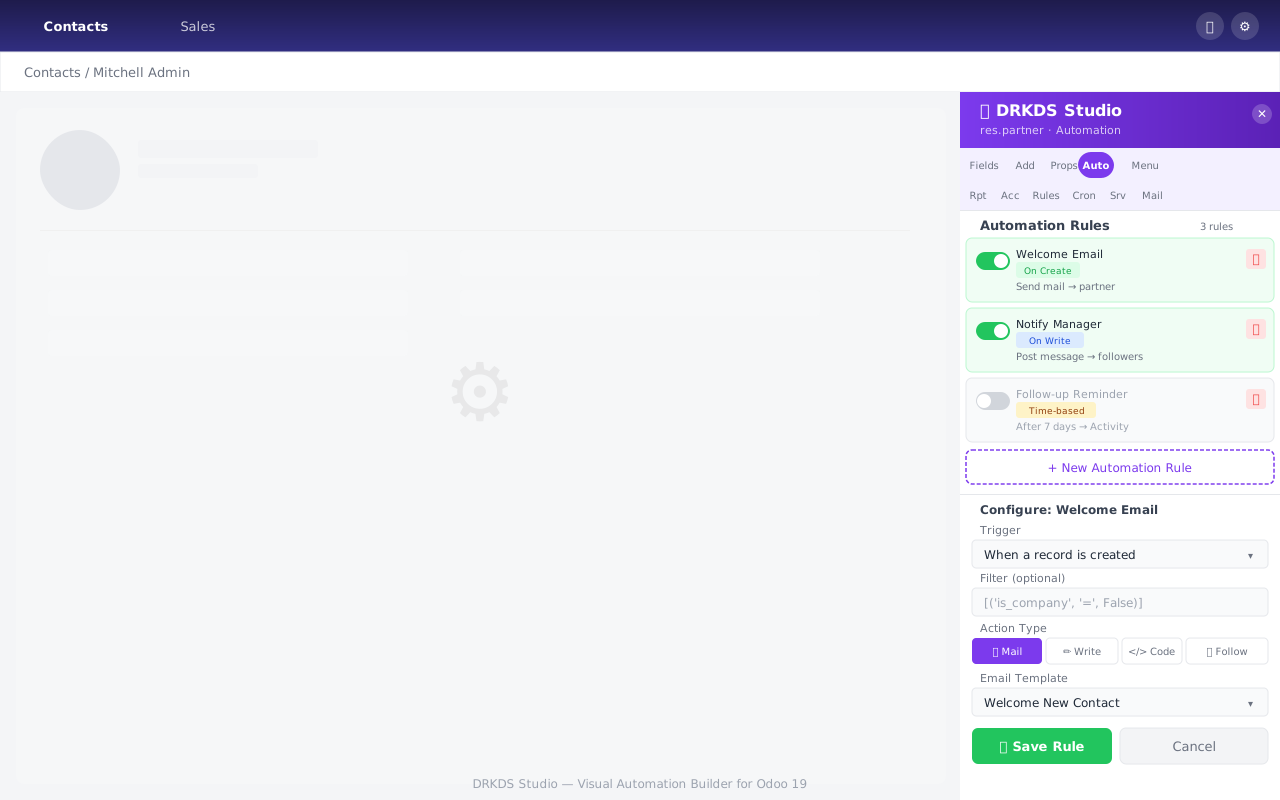
Build, manage, and test automation rules — all without leaving the Studio panel.
9 Trigger Types
Every trigger Odoo supports, exposed through a clean UI.
7 Action Types — All Inline
No Python required for most use cases. Code action available for power users.
Server Actions + Outgoing Webhooks
⚡ Server Actions
- Appear in model's Action (⚙️) menu
- Bind to list view, form view, or both
- Execute Python code on selected records
- Toggle binding with one click
- Identified by "Studio: " prefix
rec.priority = '1'
🌐 Outgoing Webhooks
- HTTP POST on Create / Update / Delete
- Choose payload fields to include
- Test button — fire immediately
- URL embedded in automation rule
- JSON payload, no auth setup
{"record_id": 42, "name": "SALE/001"}
Connect Odoo to any external system — CRM, ERP, Slack, custom APIs.
Create New Models — One Step
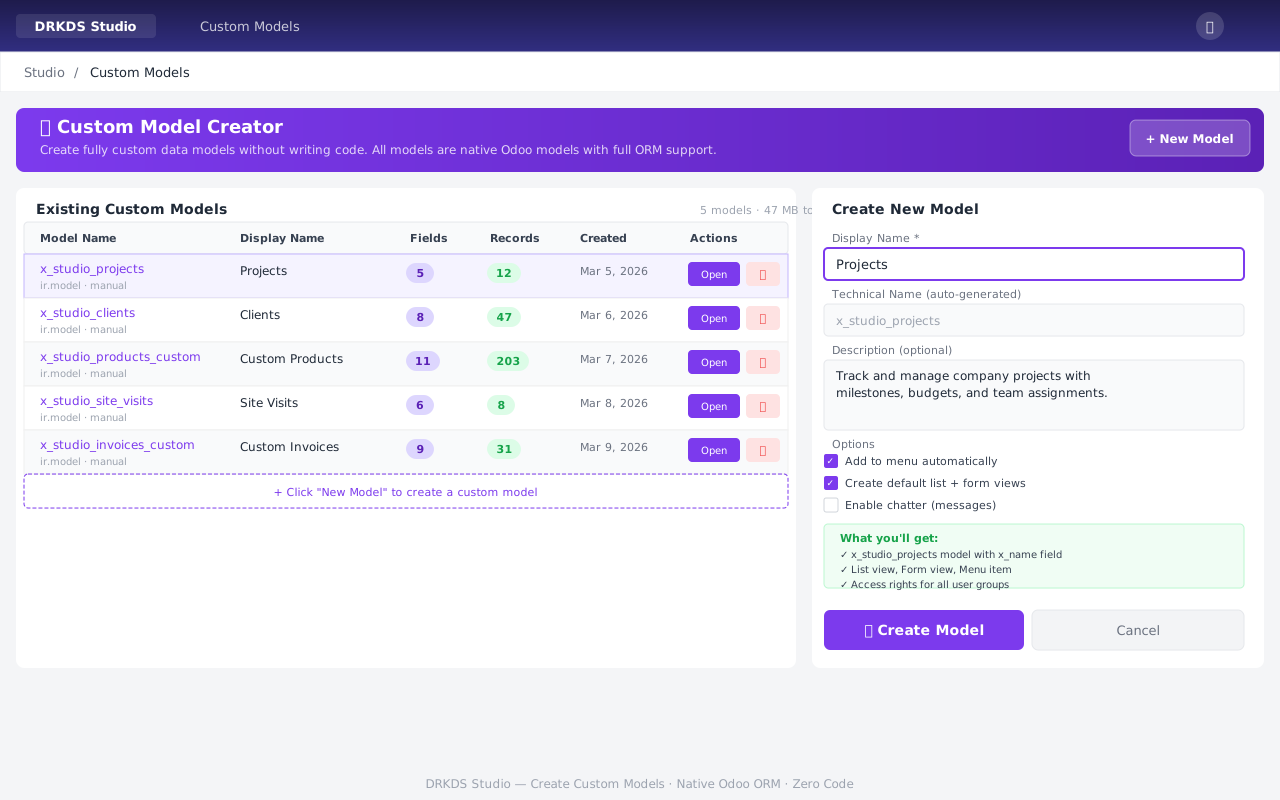
From idea to working Odoo model in under 30 seconds.
Access Rights Manager
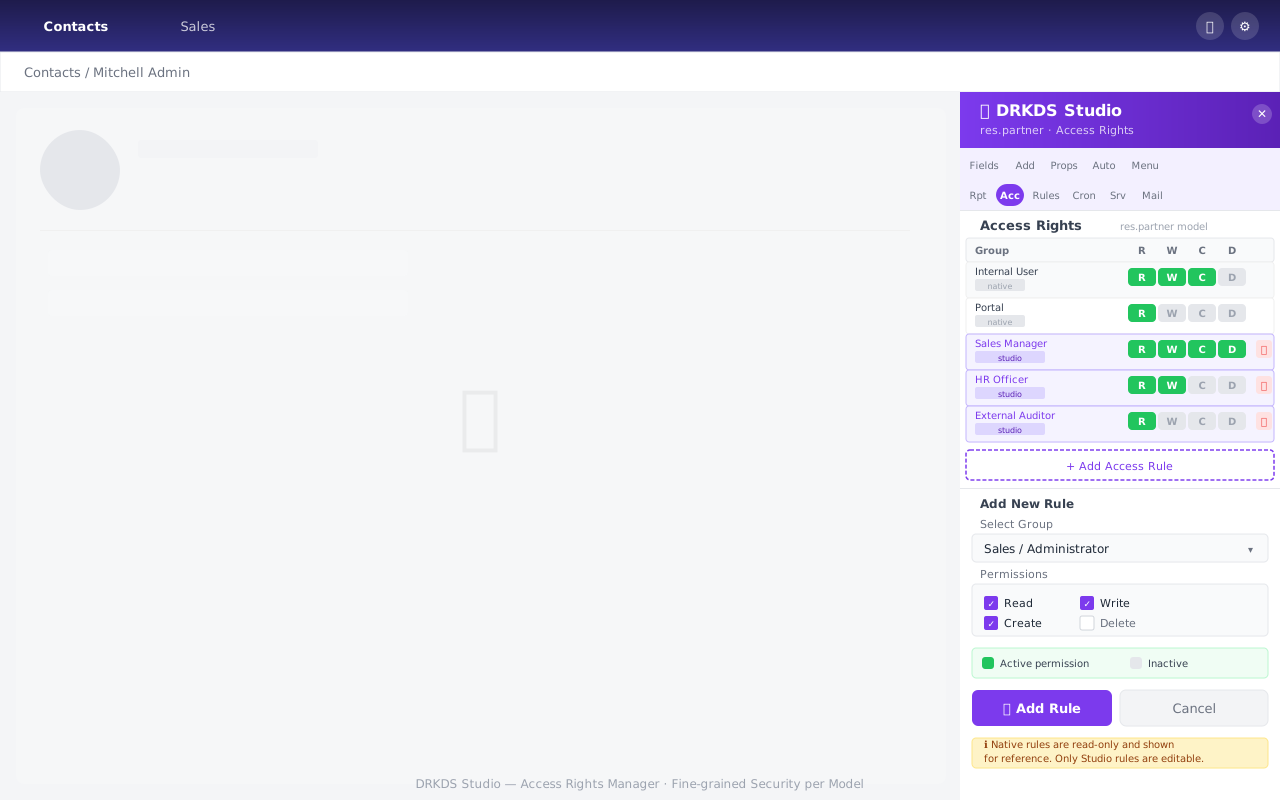
Manage ir.model.access rules with clickable RWCD permission badges per group.
Record Rules — Row-Level Security
🧩 Example Rule — Salesperson can only see own records
base.group_user
What you configure
- Domain expression (Python-like syntax)
- Which groups the rule applies to
- Global (all users) vs group-specific
- Active / inactive toggle
Common use cases
- Multi-company data isolation
- Salesperson sees only own leads
- Manager sees all, rep sees own
- Branch / territory restrictions
Limit what records each user group can see, edit, or delete — with domain filters.
Complete Security & Data Toolkit
🔢 Sequences
- Create prefix/suffix/padding sequences
- e.g. INV/2026/0001, SO-001
- Date variables: %(year)s, %(month)s
- Next number preview
🎯 Default Values
- Set field defaults per scope
- Global / per-company / per-user
- Overrides at multiple levels
- Instant effect on new records
🔖 Saved Filters
- Pre-configured search+filter combos
- Share globally or per-user
- Domain validated before save
- "Studio: " identified, manageable
📋 Selection Editor
- Add/remove dropdown options
- Works on custom (manual) fields
- Checks record usage before delete
- No XML required
Manage every aspect of data behaviour without opening developer mode.
Export as a Deployable Module
Select which models to include. Download ZIP. Install on any Odoo 19 instance.
QWeb Report Designer
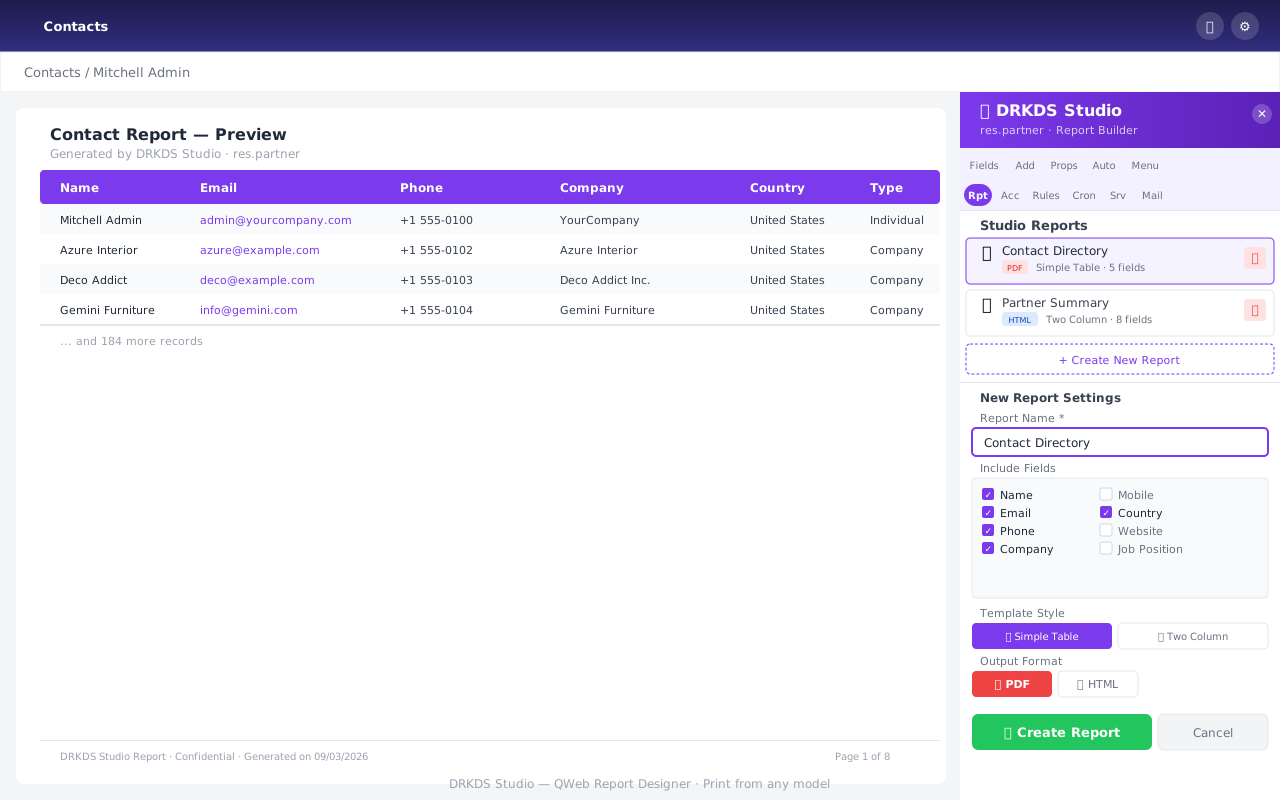
Pick fields, choose template, set PDF/HTML — report added to Print menu instantly.
Email Template Builder
Thank you for your order
{{object.name}} totalling
{{object.amount_total}} {{object.currency_id.name}}.
Regards,
{{user.name}}
Jinja2 Variables
{{object.field}}— record field{{user.name}}— current user{{env.company}}— company
Integration
- Available in Automation → Send Email
- Per-model scope
- Send from any email address
Output
- HTML email body
- Attachments supported
- CC / BCC configurable
Create reusable email templates. Reference record fields with {{object.field_name}}.
Data Management Tools
⬇️ Data Export Templates
- Pre-configure field sets for Excel export
- ir.exports + ir.exports.line under the hood
- Available in List view → Export button
- Pick from any exportable field
⬆️ Import CSV / XLS
- 3-step wizard: Upload → Map → Result
- Drag-and-drop file zone
- Auto column-to-field mapping
- Built on Odoo's base_import module
🔀 Model Relation Browser
- Visual browser of all relationships
- Many2one / One2many / Many2many
- Shows related model name + field
- Useful for domain & webhook design
🔔 Activity Types
- Create custom activity types
- Model-specific or global scope
- Category: default / upload / phonecall
- Set default delay (days/weeks/months)
From data import to relationship mapping — all accessible from the panel.
Built-In API Documentation
url = "https://your.odoo.com"
uid = common.authenticate(
db, user, pwd, {})
fields = models.execute_kw(
db, uid, pwd,
'res.partner', 'search_read',
[[['is_company','=',True]]],
{'fields': ['name','email']})
-H "Content-Type: application/json"
-d '{"method":"call","params":...}'
Every Studio endpoint documented inline — with working Python, JavaScript, and cURL examples.
Power Features
⚡ Batch Actions
- Bind server actions to list/form views
- Execute on multiple selected records
- One-click binding toggle per view type
- Results in Action (⚙️) menu instantly
🗂️ Menu Editor
- Drag-and-drop menu reordering
- Create custom menu items
- Link to any window action
- Set parent menu, icon, sequence
- Global Menu Editor overlay
sequence: 20, parent: Reporting
Add power-user shortcuts to any model's interface.
Production-Grade Architecture
🐍 Backend (Python)
🖥️ Frontend (OWL 3)
🔒 Security
98 / 98 Tests Passing
Test Infrastructure
- TransactionCase (isolated DB txn)
- Full ORM operations tested
- Controller routes mocked
- CI-ready — runs in ~2 minutes
Full TransactionCase coverage. Every major feature tested. CI-ready.
Global & Marketplace Ready
Internationalisation
GNU gettext .pot format with 156 translatable strings
Add any language: create .po file → install
App Store Ready
6 professional screenshots + full index.html description page
Odoo App Store guidelines compliant
LGPL-3 License
Use commercially, modify, distribute — fully open source
Compatible with Odoo Community license
Community Gets Enterprise Power
| Feature | Plain Community | 🎨 DRKDS Studio | Odoo Enterprise |
|---|---|---|---|
| Visual field builder | ✕ | ✓ | ✓ |
| 8 view type builders | ✕ | ✓ | ✓ |
| Automation / rules UI | ✕ | ✓ | ✓ |
| QWeb report designer | ✕ | ✓ | ✓ |
| Custom model creator | ✕ | ✓ | ✓ |
| Module export (ZIP) | ✕ | ✓ | ✕ |
| Outgoing webhook builder | ✕ | ✓ | ✕ |
| API documentation panel | ✕ | ✓ | ✕ |
| Gantt view builder | ✕ | ✓ | ✕ |
| Annual licence fee | Free | Free (LGPL-3) | Paid |
Thank You
DRKDS Studio — Odoo 19 Community
Questions? Happy to do a live walkthrough of any feature.